RDM 2023.2.30.0 and Devolution Hub problem

After Update to RDM 2023.2.30.0, I found that I unable to configure my objects (but still accessible and use). Any configuration menu (Add, Edit, Delete) become Gray
After I try change my datasource from "Devolutions Hub" to "Devolutions Online Drive" and LocalDataSource (SQLite), it's working normally.
So I conclude that RDM 2023.2.30.0 have problem with Devolutions Hub
and the final test, I remove and reinstall previous version of RDM to (2023.2.27.0). Datasource "Devolutions Hub" can be worked normally again.
All Comments (15)
Hello,
There is currently a bug with the 2023.2.30 version of RDM to connect to a Hub Personal data source; the developers are working on a fix.
The workaround to fix the issue is to go to File → Devolutions Account → (uncheck) “Keep me signed-in”
Best regards,
Richard Boisvert
Hi,
We resolve the issue internally and the fix should be available starting with 2023.2.31 which should be released in the next few days.
As a note this was an issue in our new version mismatch verification used to set data sources to read-only if needed.
Regards,
Jean-Francois Duchesne
Hello,
The issue has been resolved in the 2023.2.32 release, which is now available: https://devolutions.net/remote-desktop-manager/home/download/
Best regards,
Richard Boisvert
This version is not available yet....
Hello,
I meant version 2023.2.32 - my apologies for the typo. Since then, the 2023.3 release has been available and must now be used to connect to Hub Business. It is recommended for Hub Personal as well.
You can download it from this link: https://devolutions.net/remote-desktop-manager/home/download/
Best regards,
Richard Boisvert
I'm running 2023.3.39.0 64-bit and I've started having this issue. I do not know exactly when but I just realised I can no longer add new entries or edit the existing ones. I'm 90% sure I did edit/add vms within the last month and 100% within the last 2, so it must be something recent.
File → Devolutions Account → (uncheck) “Keep me signed-in” did not help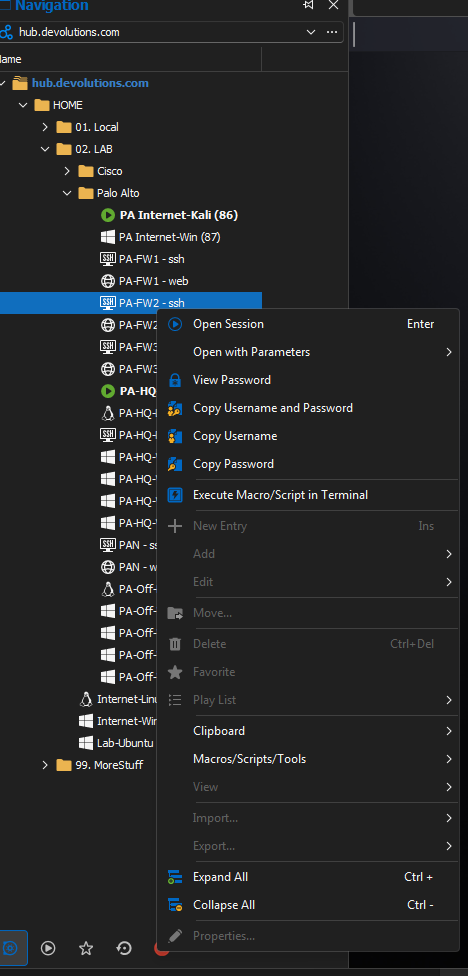
bZlGow3gTy.png
@calinbaci,
Please update your RDM to version 2024.1.15.0. You can find this version here https://devolutions.net/remote-desktop-manager/home/download/
This will resolve your issue.
Best regards,
Jeff Dagenais
Thank you.
I can confirm that updating sorted the issue.
I tend to update when prompted, might have missed it :)
Hello, I'm running it on Mac 2024.1.7.2 and Windows 2024.1.27.0 and I can`t add or edit my entries either, the same problem with this topic. Could someone help me?
Just updated to version Windows 2024.1.28.0 and having the same issue.
If I log in to Devolutions Hub Personal, I can edit or create entries. That is my workaround in the short term.
Hello,
Thank you for contacting us regarding your issue!
Would it be possible for you to create a portable installation of the latest version of RDM and see if this issue still occurs? To do so, you will need to do the following (Only for Windows):
(Close RDM)
1- Download the .zip file below:
https://remotedesktopmanager.com/home/thankyou/rdmbin
2- Create a new folder on your Desktop
3- Extract the content of the .zip file into the folder created at #2
4- Go to this folder once the .zip file has been extracted and run remotedesktopmanager.exe
5- Connect to your data source
This test will allow us to rule out your local installation of RDM as a possible cause for this issue.
Please note that if you are using an Advanced Data Source, I would recommend skipping step #5 and using the default data source created by the portable installation of RDM instead.
Best regards,
Maxim Robert
It worked Maxim, does this mean there is a problem installing the app? Is there any procedure to completely remove it and reinstall it? and on Mac?
Hi Borbax,
I appreciate your prompt reply!
If the portable installation was successful, it suggests an issue with your RDM configuration might be due to an accidentally enabled option. To address this, I suggest resetting your RDM configuration using the steps outlined below:
- Close Remote Desktop Manager.
- Navigate to: %localappdata%\Devolutions
- Rename the RemoteDesktopManager folder to RemoteDesktopManager.old.
- Restart RDM.
Please be aware that resetting the configuration will erase all your data source information, which you must re-enter.
Feel free to reach out if you have any further questions or concerns. We're here to assist you.
Best regards,
Maxim Robert
Nice, it's worked on Windows, and Mac, I deleted the folder "com.devolutions.remotedesktopmanager" in /Users/username/Library/Application Support/, and it worked too!
Renaming the RemoteDesktopManager folder fixed it for me. Thanks.
